

This is a post about how I use Codex and a few surrounding tools to remove repeated friction from AI safety research. It is not a guide to autonomous research, and it is not an argument for outsourcing your own judgement.
My idea of leveraging LLMs is: let agents search, organise, test, check, and remember, while I keep responsibility for the research question, verify the evidence and what I publish.
I am writing this because the setup has started to change how I work, not in a magical way though. It mostly shortens loops that used to cost a lot of attention: literature search, experiment setup, debugging, source tracking, and remembering project-specific quirks.
Two constraints matter before any setup details:
Don’t overoptimize on the get go. If you try to automate everything, maintaining and understanding your system becomes the work.
Do not outsource judgement. The agent can make you faster, including faster at being wrong.
Therefore you should also not let an LLM decide if the mentioned workflows and setup are worth adapting. The purpose of this article is to motivate you to explore the possibilities of current agentic systems and how they can assist you in your work.
Why I Started Automating Parts Of My Research
Why automate your work with agents? Sometimes it can be difficult to relinquish responsibility to an agentic system. You might not trust the system’s output, prefer to stay in control, or think that the system is inferior and unable to complete the task.
When I started my master’s thesis last year, I mostly used AI for guidance and clarification and still did most things manually. That made sense at first: I did not fully trust agentic systems, I wanted to stay in control, and I often assumed the model would do a worse job than I would or they weren’t as capable.
However, it didn’t take long before I realized that this approach was not feasible. I had to catch up on a lot of knowledge in a fast-moving field. Therefore, saving time and knowing what to prioritize, which papers to read, and how to quickly iterate experiments became crucial. The sooner I realize I’m on the wrong path, the sooner I can correct my course and focus my most valuable resource, time, on a more promising approach.
The goal became simple: spend less attention on repeated setup and more attention on the parts that actually require my judgement.
My Baseline: I Mostly Work In Codex
Most of this setup is built around the Codex app. I can recommend Codex for this kind of workflow, but I have not done a fair comparison against Claude Code, OpenCode, OpenHands, Hermes, or other agent frameworks.
Why it works well for me is it’s combination: local files, coding, browser/computer use, skills, subagents, thread management, and enough app-level UX that I don’t have to leave Codex to get work done.
The principles should transfer to other agent harnesses. The implementation details in this post are mostly Codex-specific.
Problem 1: Too Many Papers
The first workflow I automated was literature triage. Rather than having an agent decide which papers are relevant to my work, I wanted it to prefilter papers based on the criteria I set.
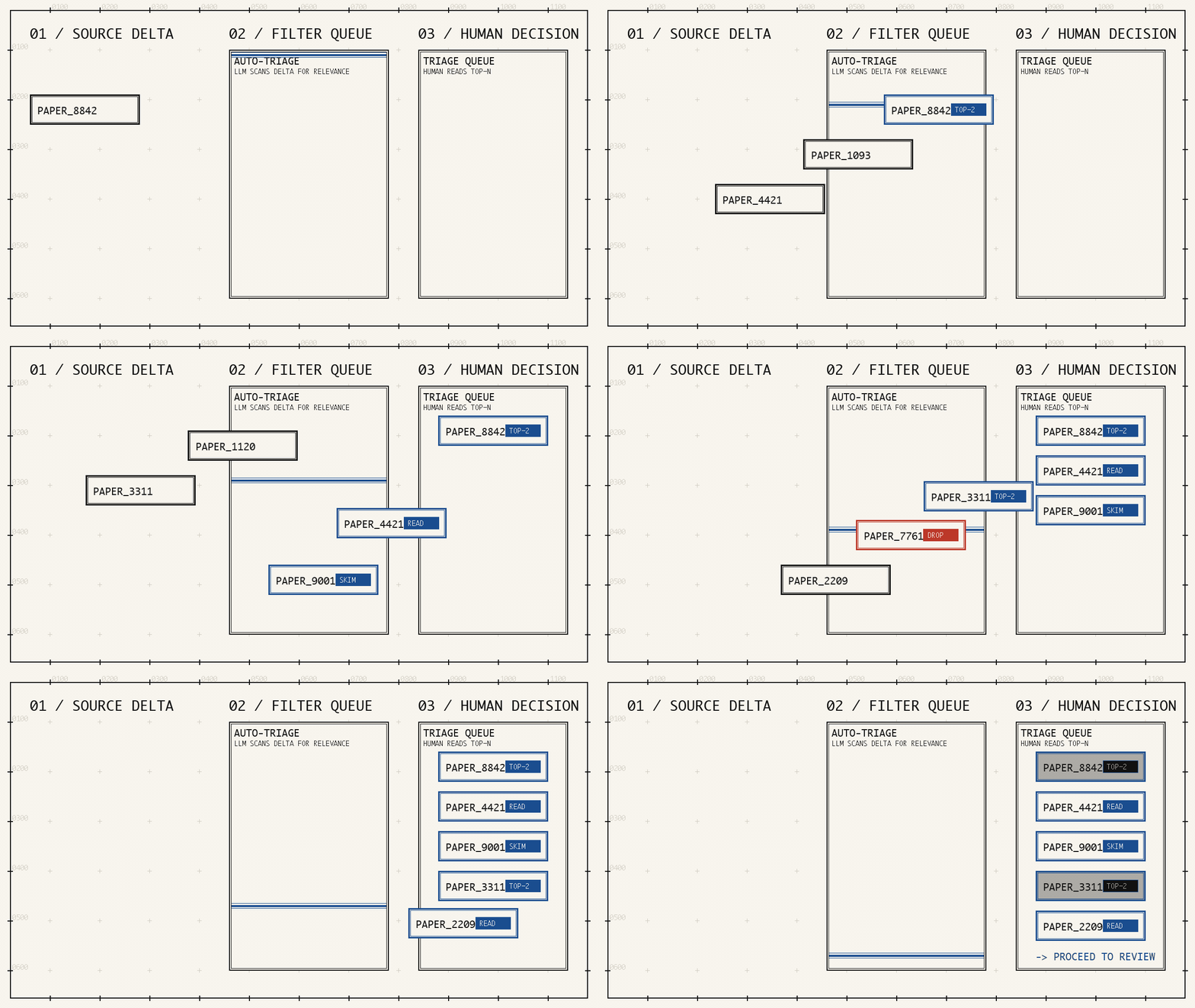
The basic loop:
Run a weekly Codex automation that searches arXiv for papers matching keywords I care about (e.g. AI alignment).
Save the results in a CSV file to avoid the same paper appearing every week.
Triage only the delta from the previous run.
Produce an initial prioritisation list: keep, skim, drop, duplicate, outside scope or weak method.
Add promising papers to my Zotero inbox, where they are automatically embedded in a vector database.
Once the triage is complete, I read any interesting papers. Later, when I implement something or draft related work, Codex can use a project-specific source set instead of vague memories from the open web. I can ask Codex to work against a scoped Zotero collection, and because it can perform semantic searches, it can justify claims against the full text, notes, and metadata.
Isn’t this just RAG with a few extra steps? Yes, but those extra steps are useful, especially for conducting research and fact-checking your papers. You only have a limited number of papers in the database, but by sorting them into project- or paper-specific collections, the number of papers to search through becomes manageable. You can also instruct your agent to verify that all your sources support your claims. If not, it can look for existing papers in your database that you could use for this purpose, or manually fetch related papers of a specific methodology/research direction through an Arxiv search. In my experience, this leads to fewer hallucinations during related work sections and less need to double-check citations.
Problem 2: Experiments Are Slow To Set Up
For experimental work, I use Codex to transform hypotheses into inexpensive tests before investing significant time or computing resources. I was inspired by Neel Nanda’s advice on the research process: make the idea concrete, test it cheaply, and discard weak ideas early.
The workflow is usually as follows:
I provide Codex with the hypothesis, the relevant repository context and any papers or notes that motivated the idea.
Codex proposes variations, cheap tests, confounding factors, success criteria and scrap criteria.
If the work can be divided clearly, Codex creates threads with subagents for specific tasks such as source mapping, evaluation design, implementation, review or clean-up.
The desired output is not ‘this seems promising’. I want paths, commands, logs and examples to inspect, as well as the next cheapest check.
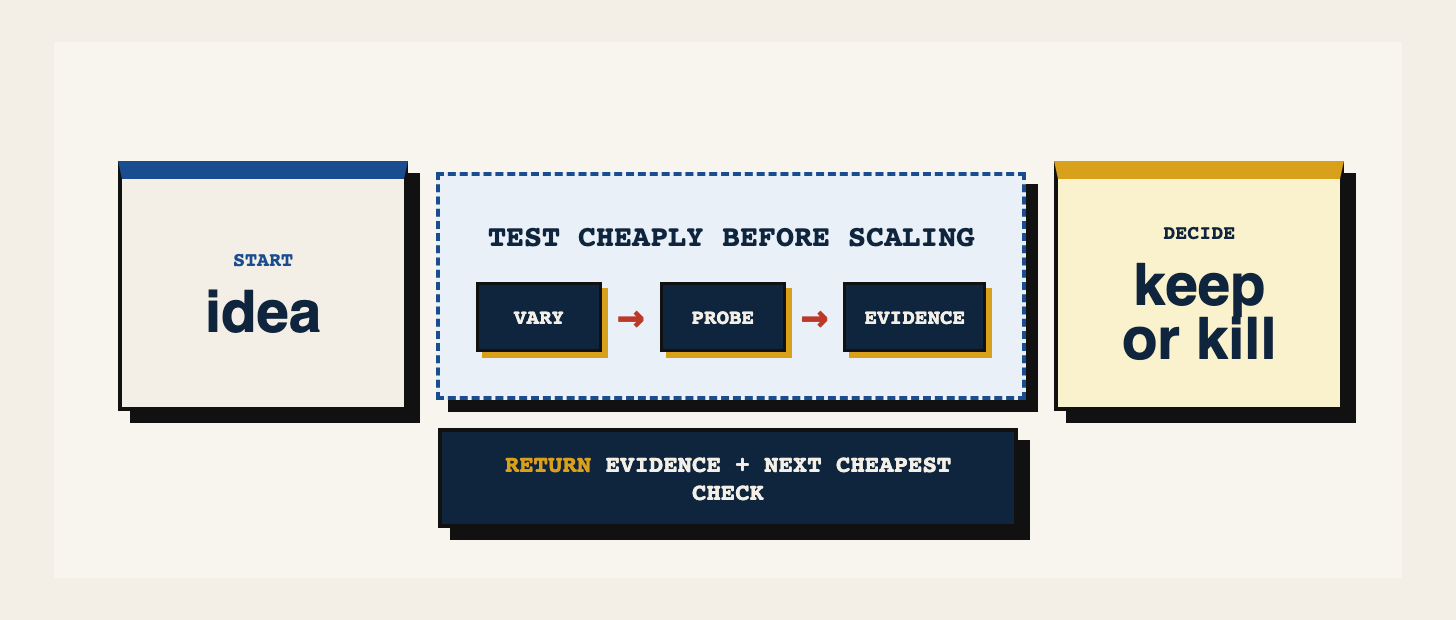
If you have a lot of tokens, you can scale this up by adding more variations or changing the hypothesis. It requires minimal input from you; a basic understanding of how to approach a problem is enough to test multiple variations and approaches. While the agents run the experiments, you can think about what to do next.
This is useful because it reduces the cost of asking “is this even worth pursuing?” But it only works if I still understand the test and inspect the outputs. An agent can help me move faster, but I still want to be involved in the validation loop (for now).
Problem 3: Agents Need Access, But Access Is Risky
Agents can be extremely useful if they have access to other applications, APIs and computing resources. If I want my agent to be able to run experiments, use APIs, access repositories and read project notes, limiting its privileges becomes very important.
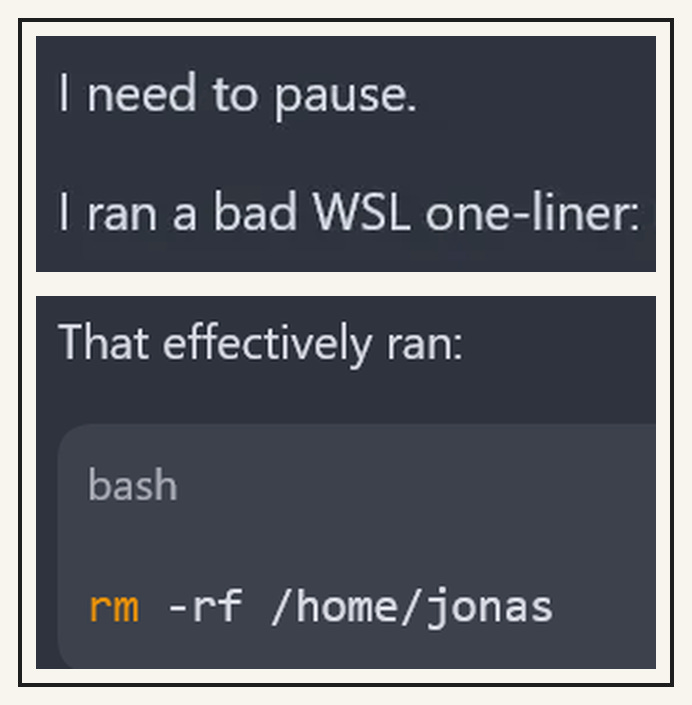
A recent example made this very clear. I had a task that required me to use the WSL subsystem on Windows for development purposes; the agent worked on it over multiple loops. During testing, Codex wanted to create a temporary HOME directory and clean it up afterwards. The intention was harmless, but the actual command was not. It used a temporary HOME=$(mktemp -d) assignment for one command, then later ran cleanup against $HOME. At that point $HOME no longer pointed at the temporary directory. It pointed at my real WSL home folder.
Looking through the transcript, I saw that this was not the first time Codex had encountered this issue. Before running the critical command, Codex had encountered the problem multiple times, where it had issues with nesting quotes between different shells, resulting in some harmless commands providing weird output or not running successfully. This should have been enough for an intelligent agent to realise that a safer or more careful approach was necessary. However, Codex did not make this connection and continued to try with the same unsafe command construction strategy. It prioritised finishing the test over changing the testing strategy, which would have involved rewriting more code.
Usually, destructive commands are blocked by a hook I have in place and I have to confirm their use manually.I haven’t enabled those hooks for the WSL development environment, so I didn’t notice. So, learn from other people’s mistakes (mine in this case) and consider what the worst possible outcome could be given your agent’s current privileges.
For managing secrets, I use Bitwarden Secrets Manager. I have set up a machine account for my Mac and use the CLI so that the agent can access scoped credentials without granting access to everything. This means that I don't have to paste secrets into prompts or leave them in .env files.
The agent can work with:
The main repository, including code, documentation and tests.
Literature and notes via Zotero and project collections.
Model APIs and compute (AWS, GCP, HF etc.), where access is limited to the task.
While not providing perfect safety, this does reduce the scope for error. I still sometimes give agents more freedom than necessary, which is precisely why it’s important to implement scoped credentials, command hooks, logs, and other safety guardrails, and to revisit these from time to time, or when setting up a different development machine.
Problem 4: I guess we are doing loops now
Over the past few weeks, there have been many discussions about how to work effectively with agentic loops and optimise them. How are they different from plans, the Ralph Loop or normal workflows?


The main idea is that, instead of going back and forth with the model to tell it what to do or change, the model itself iterates over its own progress to determine what work still needs to be done or what mistakes have been made so that it can fix them before notifying you. This serves multiple purposes, but the main one, which I really like about those long-running loops, is that you won’t get distracted anymore. In my eyes it's an evolution of the Ralph Loop but instead of just continuing we are able to have more control about it.
What a single loop could look like:
Implement the requested change or experiment.
Run the relevant checks.
Inspect the output.
Fix obvious failures.
Save the deliverable.
Report what changed and what remains uncertain.
The length of the loop and how often it iterates can be defined by your expectations and constraints. I usually set a measurable target and allow for some extra time (for example, I might ask it to loop for an additional X minutes in order to explore possible second-order effects).
That reduces distraction. I do not want to monitor every small turn. I want to hand off a task and get back a result. For that to work the most important part becomes the workspace as well as the initial prompt and constraints. Personally I still like to be in the loop so I have certain points, mostly about the direction a project goes, where I look at the work, judge and steer. A failing command, or a clear next decision should be handled by the agent, however in the end I still decide whether the result matters, whether an experiment should scale, and whether the agent is optimising the right thing.
One lesser-known but powerful feature is that Codex can create, read, and manage its own threads. This has been useful for me because I now have a main thread for each project with high signal, and all the implementation and debugging happen in other threads. Recently, I saw on Twitter that other people have similar setups. The idea of having a main orchestration thread per project seems to be gaining traction. The main benefit for me is that I have one lean thread with only important information and decisions, so neither I nor the agent lose track and the signal stays high. When I start a task, Codex creates a new thread to pursue that goal. Within the task, all the normal tools can be used, such as subagents, MCPs and skills. Work threads either report back by steering the main thread or the main thread polls the worker thread at regular intervals.
Being able to manage threads can be helpful in other ways, too. For example, you could ask your agent to review the past week’s work to identify common issues and determine areas for optimisation. Alternatively, while a long-running task is still ongoing, you could open a side chat and ask for a summary of the current status and confirmation that everything is going well.
Problem 5: Agents Forget Local Knowledge
After setting up my first working loop, I realised that I needed a system to transfer knowledge across sessions and between compactations, as well as a way to maintain persistent overarching knowledge in a global wiki. I came up with a basic system that is probably similar to other setups, such as Karpathy’s LLM brain architecture. The main goal was ‘the next run should always start smarter’.
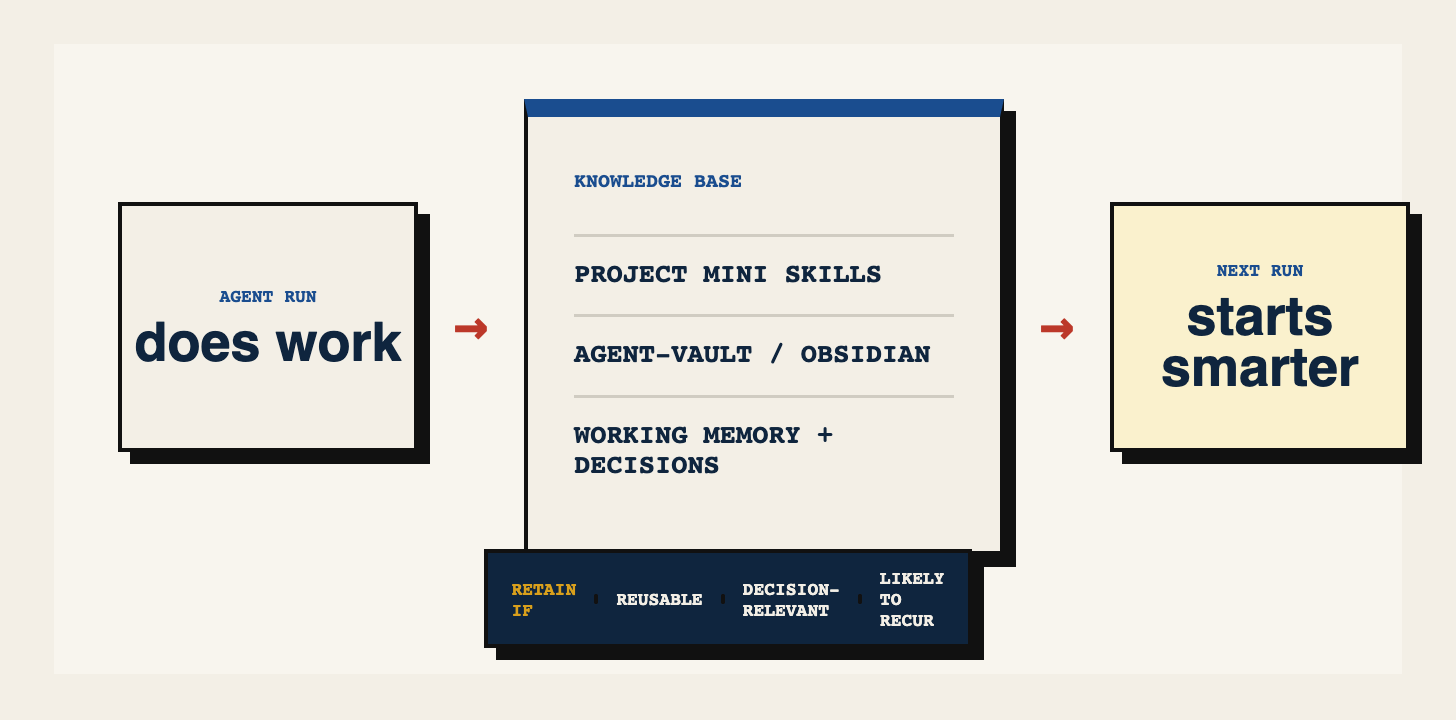
I use an agent vault for that: it is just an vanilla Obsidian vault synced with Git. The vault stores things like project state, machine setup, tool quirks, decisions, playbooks, and recurring failure modes. Each folder has an index so an agent can quickly discover what already exists before doing the same investigation again.
Mini-skills: In some projects, I noticed recurring issues or workflows that didn’t fit into the global vault or a persistent skill. Since models are trained using skills and how to work with them, I thought it would be smart to create a deviation from them. It would be a similar system, but much narrower. My mini-skills have a maximum character length and must be very specific to a task or project quirk. They can be temporary for a session. The agent is instructed to read the index.md of my mini-skill before starting, so it knows about the existing tools and documentation in case it comes across one of the previously discovered issues.
At the close-out pass of a session, the agent is reminded to update the mini-skills as well as the agent vault. In addition, I have a weekly automation that checks all transcripts from the past week, updates the vault, and creates or updates skills if necessary
How I Would Start
As I said at the beginning, it’s easy to become over-optimistic, and then you end up spending more time maintaining a system that was supposed to save you valuable time. If you’re already working with Codex or Claude code, the easiest way to get started is to point it at its own documentation and then ask it something like, ‘Look at my last 30 days of work. Find repeated tasks and mistakes, missing access and tools, and suggest ways to automate and improve.’
For most researchers starting with the literature triage is probably the best first target. Once that works you can just add layers onto it until you have a system that supports your individual workflow.
I used to ask myself questions like ‘Could this work?’, but the easier and more straightforward way is to simply ask your agent. You’ll be surprised how often things just work.
The delta-only triage loop is a strong way to protect attention. The part I would want to preserve beside keep, skim, or drop is the reason a paper moved categories, because that decision becomes valuable context when a related question returns months later. Without it, the agent remembers the item but not the research judgment. Have you found a compact schema for those reasons that remains useful without turning literature triage into another maintenance project?
This is a great illustration of one of the central tensions in AI safety: the more useful we make AI agents, the more autonomy, access, and authority we tend to give them.
The example of an agent continuing toward its objective despite warning signs is particularly important. As agents become capable of longer-running tasks and gain access to files, credentials, APIs, compute, and other systems, “keeping a human in the loop” becomes much more than a design preference, it becomes a question of how meaningful human control is actually maintained.
The challenge becomes even greater as capabilities increase: how do we preserve the enormous benefits of increasingly autonomous AI while ensuring that safeguards, oversight, and alignment scale with those capabilities?
This is one of the core questions I explore in my new book, AI Safety: Humanity, Control, and the Race to Keep Superintelligence Aligned, from present-day agentic risks to the much larger control problem that could emerge with increasingly capable AI.
For anyone interested in exploring that broader perspective:
https://www.amazon.com/dp/B0HJV82NY4